
Nostalgia.GBA Pro (GBA Emulato
Nostalgia EmulatorsArcade
4.2120.00 Reviews
- Version
- 2.5.6
- Installs
- 10.00K
- Age Rating
- Everyone
Screenshots
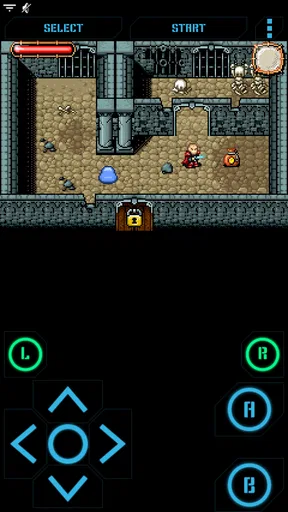
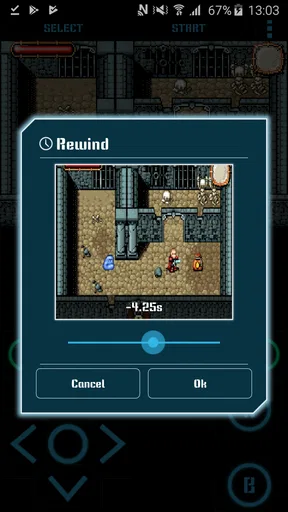
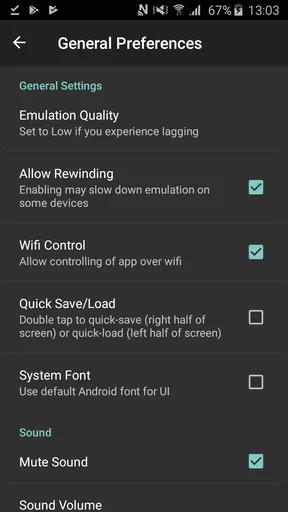
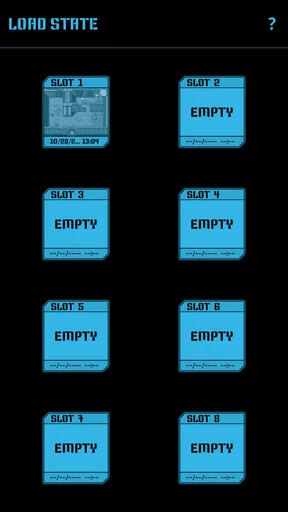
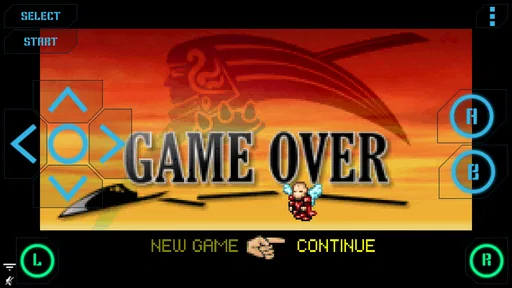
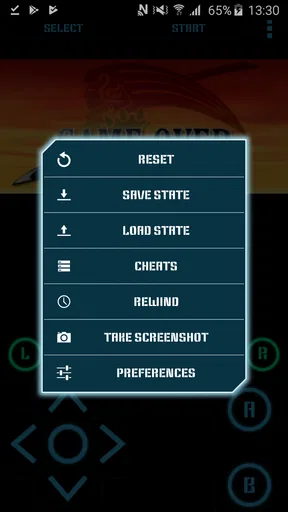
Our Review of Nostalgia.GBA Pro (GBA Emulato
 Analysis by Appyee
I approached Nostalgia.GBA Pro as a practical way to revisit Game Boy Advance software on a modern Android device, rather than as a game with its own campaign, levels, or unlock tree. That distinction matters. Its appeal comes from how quickly it lets me get from opening the emulator to playing a legally obtained GBA title, and from the control I have over that play session. The app is an arcade-category game from Nostalgia Emulators, and its store summary presents it as a high-quality GBA emulator.
My first impression was that the experience is built around reducing friction. I am not waiting for a separate launcher, sorting through a complicated front end, or treating the emulator itself as the challenge. The real early goal is simple: prepare a compatible game, make the controls comfortable, and establish a reliable routine for returning to it. That makes the app especially interesting for short sessions, old favorites, and people who want their phone to behave more like a compact handheld.
How the first session sets expectations
The first useful question is not “What do I unlock?” but “How quickly can I make this feel playable?” With an emulator, the answer depends heavily on the device, the game being used, and the time spent adjusting the setup. I found that the best approach is to begin with one title rather than trying to organize an entire library immediately. A single test game makes it easier to judge touch response, screen proportions, sound behavior, and whether the on-screen layout suits the way I hold the phone.
That early test is more important than it sounds. GBA games often rely on quick directional changes, repeated button presses, or careful timing. A layout that feels acceptable in a menu can become tiring during a fast arcade sequence. I recommend playing for a few minutes with the phone held exactly as it will be used day to day, then moving the virtual buttons before building a larger routine around the emulator.
The Pro edition is priced at $2.99, so I see it as a focused purchase rather than an impulse download. The cost is easier to justify when I already know I want a dedicated GBA experience and expect to return to it. Someone who only wants to experiment with emulation for a few minutes may prefer to test a free alternative first, while a regular player may value having a paid version instead of treating the emulator as disposable software.
One practical point is that the emulator does not replace the responsibility of obtaining games legally. I would prepare my own compatible files and keep them organized before blaming the app for a slow start. A clean folder structure, descriptive filenames, and one backup location make the experience much less frustrating. This is one of the hidden time-savers: the emulator can be ready, but a messy library still makes every session feel harder than it needs to be.
What creates a sense of progress
Because this is an emulator, progress signals come from the games I choose, not from a universal account level or a shared reward track inside the app. A role-playing adventure may give me long-term character development, while a platformer may measure progress through stages and personal mastery. A puzzle title may offer almost no persistent advancement at all. The emulator’s job is to make those different forms of progress easy to resume and manage.
That changes how I evaluate retention. I return because a particular GBA game gives me a reason to continue, and the emulator becomes valuable when it removes obstacles between sessions. A good setup means I can stop during a commute, pick up the same title later, and avoid rebuilding the controls each time. The value is therefore cumulative: the more carefully I arrange my library and preferences, the more natural the next session feels.
For longer games, I find it useful to keep a simple note outside the emulator with the current objective, important locations, and any control changes I made. That may sound old-fashioned, but it prevents the common problem of returning after a break and spending the entire session remembering what I was doing. It also separates genuine game progress from emulator configuration, which makes the overall experience easier to understand.
Another useful habit is to give each title a short trial before committing to a long playthrough. GBA software varies widely in pacing and control demands. A game that feels perfect for a five-minute break may become uncomfortable over an hour, while a slower adventure may reward longer sessions. Testing several styles helps me decide whether the emulator is serving my actual routine instead of merely preserving a nostalgic idea of handheld play.
Difficulty belongs to the games, but comfort changes the result
Nostalgia.GBA Pro does not impose one difficulty curve across its library. The challenge depends on the original game, and that can range from forgiving early stages to demanding timing, resource management, or repeated attempts. What the emulator can change is how manageable that challenge feels. Touchscreen controls, display size, and the position of virtual buttons all influence whether a difficult section feels fair or simply awkward.
I pay particular attention to the difference between a game being hard and the phone setup being inconvenient. If I miss inputs because my thumbs cover the screen or because the buttons are too close together, I adjust the layout before judging the original design. This is a concrete advantage of spending time on configuration: it lets me identify whether I am failing a challenge or fighting the device.
There is also a trade-off between portability and precision. A phone is always nearby, but it does not automatically provide the tactile certainty of a dedicated handheld or a physical controller. For turn-based adventures, menu-heavy games, and slower exploration, that compromise is usually easy for me to accept. For fast action games, I am more selective. A controller-supported setup may be the better choice when accurate directional input matters more than convenience.
I would not use the emulator as a shortcut around a game’s intended challenge. If a title is built around repeated attempts, learning patterns, or careful resource use, the satisfaction still comes from improving. The app is most successful when it preserves that loop while making the game available in a modern setting. It is less appealing to anyone expecting the emulator itself to provide a structured sequence of goals or rewards.
Pacing, short sessions, and the pressure to keep returning
The strongest retention quality here is flexibility. I can treat a GBA game as a quick break, a weekend project, or a longer journey, depending on the title. That makes the emulator fit routines where a traditional console is inconvenient. I might play a few minutes while waiting for an appointment, then return to the same game at home when I have more time. The session length belongs to me rather than to the app.
That flexibility also exposes a weakness. If I keep several games available at once, the choice can become distracting. I may spend more time browsing files than playing, especially when nostalgia encourages me to start multiple titles. I get better results by choosing one main game and keeping only a small secondary option for shorter sessions. This creates a clearer rhythm and makes progress easier to notice.
For a realistic everyday example, I would use the emulator during a commute with one adventure game as the main save and a compact arcade-style title for moments when I have only a few minutes. The longer game gives the week a sense of direction, while the shorter one prevents the app from feeling demanding. Before leaving home, I would check the control layout and battery level, because discovering an uncomfortable setup halfway through a journey is exactly the kind of small friction that makes a good app feel unreliable.
Retention is therefore not driven by daily rewards, notifications, or artificial pressure. It comes from the relationship between the original games and the convenience of having them on a phone. I appreciate that restraint. At the same time, readers who want a self-contained arcade game with fresh challenges every day should understand that this is not what they are buying. The long-term appeal depends on the library and on personal taste.
Who will get the most from the Pro edition
I think the app is a strong fit for Android users who already enjoy GBA games and want a dedicated emulator with a paid entry point. It also suits players who prefer organizing their own library, adjusting their play environment, and choosing their own pace. The Everyone content rating makes it approachable from an age-classification standpoint, although the actual tone and themes still depend on the games being played.
The technical entry point is relatively broad: the current version is 2.5.6 and requires Android 5.0 or later. That makes it relevant to people using older Android hardware, though compatibility in practice can still vary by device and by the specific game. I would test one representative title before moving a complete library to a new phone, especially if the device is modest or if I expect long sessions.
The app has an average rating of 4.2 from around five hundred ratings, with around one hundred twenty written reviews, and it has passed ten thousand installs. Those figures suggest a real user base without making the app look like a universal replacement for every emulator. I read that as a sign to set realistic expectations: it is established enough to consider seriously, but personal comfort with the controls remains more important than popularity.
Nostalgia Emulators is a sensible developer choice for someone specifically looking for a GBA-focused product rather than a broad multi-system tool. That focus can be an advantage because the experience is centered on one handheld family. It can also be a limitation for anyone who wants one application to cover many generations and consoles. In that case, a multi-system emulator may reduce the number of apps installed, even if it introduces a busier interface.
Where it fits beside the usual alternatives
Compared with playing GBA software on original hardware, this emulator wins on convenience. My phone is easier to carry, and I do not need to keep a separate handheld nearby. Original hardware still has the edge in tactile controls, physical presence, and the particular feeling of using the device the games were designed around. If that physical experience is the main reason I play, an emulator cannot fully replace it.
Compared with a free emulator, the Pro edition has a clearer value question. A free option may be enough for occasional testing, particularly if I am unsure how often I will play. Paying $2.99 makes more sense when I want a dedicated tool and expect to maintain a regular library. I would not choose the paid version simply because “Pro” sounds more complete; I would choose it because the focused experience is worth paying for in my routine.
Compared with a broad multi-console emulator, this app may feel less cluttered for a person interested specifically in GBA. A general-purpose alternative can be better for someone who regularly moves between systems and wants a single library. The trade-off is concentration versus range. I prefer the focused approach when I am starting a GBA playthrough and do not want unrelated platforms competing for attention.
Compared with cloud or streaming approaches, local emulation is more suitable for travel and inconsistent connections because the play session is not built around a remote service. However, it requires me to take care of my own files and device setup. That responsibility is not a flaw in itself, but it is part of the ownership experience and should be considered before purchasing.
Small workflow choices that make a large difference
My first recommendation is to create a “test title” routine. I launch one game, play through several different types of input, and check the emulator during both quiet menus and fast action. This reveals more than opening a title briefly. If the controls feel wrong, I fix them before importing or arranging anything else. It is a simple way to avoid confusing setup problems with game difficulty.
My second recommendation is to separate active games from archived ones. I keep the titles I am currently playing easy to find and move everything else into a clearly named archive. This reduces decision fatigue and makes the progress loop more visible. It also helps when I return after a busy week, because I can immediately see which game deserves attention instead of scanning an oversized list.
My third recommendation is to plan around the phone’s physical context. On a small screen, landscape orientation may make action controls easier to reach, while portrait play may be more convenient in a crowded public space. I would not assume one arrangement works for every title. Changing the layout for a specific style of game can be worthwhile, but I would keep notes about those changes so I do not spend the next session rediscovering them.
Finally, I would make backups part of the routine rather than an emergency response. A long adventure can represent many hours of personal progress, and a phone change or storage problem can turn enthusiasm into frustration. The emulator may make resuming convenient, but that convenience depends on treating save files and game files carefully. I consider this essential for anyone using the app for a serious playthrough rather than occasional nostalgia.
My progression verdict
Nostalgia.GBA Pro succeeds when I judge it as a focused doorway to GBA games, not as a standalone arcade experience with its own unlocks and challenge ladder. Its progression strength is indirect: it helps me keep returning to the games I choose, supports different session lengths, and rewards a little preparation with a smoother routine. The pacing comes from the original library, while the emulator determines how comfortably I can follow that pace.
I would recommend it to Android players who already know they want GBA emulation, value a dedicated app, and are willing to organize their own files and controls. I would skip it if I want a new game with built-in goals, a universal reward system, or a large multi-console catalog in one place. I would also look elsewhere if physical buttons are essential for fast action and I do not plan to use a controller.
For me, the $2.99 price is reasonable when the app becomes part of a regular handheld-style routine. The purchase is less convincing for someone who is only curious about emulation and has no particular GBA library in mind. In the right situation, though, the focused design is the point: it keeps attention on the games, gives me room to shape the setup, and avoids adding artificial pressure to a hobby that already has plenty of natural reasons to continue.
Verdict
Strengths of Nostalgia.GBA Pro (GBA Emulato
- Supports save states for quick progress recovery.
- Customizable on-screen controls improve playability on phones.
- Fast-forward and frame-skip options speed up repetitive sections.
- Works offline, making it useful for travel or limited connectivity.
- Compact app size uses little storage compared with many games.
Limitations of Nostalgia.GBA Pro (GBA Emulato
- Requires legally obtained game files; no commercial ROMs are included.
- Touch controls can feel imprecise during fast platforming or action games.
- Advanced settings may be confusing for users new to emulators.
- Compatibility and performance can vary between different devices.
- Some features may depend on the device’s Android version or hardware.
Other Releases by Nostalgia Emulators
View All
NostalgiaNes Pro
Arcade3.7
Similar Picks in This Category
View All
Subway Surfers
SYBO Games4.6

Stickman Party 234 MiniGames
PlayMax Game Studio4.6

Subway Princess Runner
Ivy4.4

Temple Run
Imangi Studios4.2

Zombie Tsunami
Mobigame SAS4.6

Stack Ball - Crash Platforms
CASUAL AZUR GAMES4.5
Frequently Asked Questions
What is Nostalgia.GBA Pro and what does it do?
Nostalgia.GBA Pro is an emulator designed to run Game Boy Advance games on compatible Android devices. It recreates the original console environment so users can load legally obtained game files, commonly called ROMs, and play them with on-screen controls or a compatible physical controller. The application is intended for people who want portable access to classic GBA titles, although performance and compatibility can vary depending on the device and game.
Does Nostalgia.GBA Pro include Game Boy Advance games?
No, the emulator generally does not provide copyrighted Game Boy Advance games for download. Users are expected to obtain game files through legal means and load them into the application themselves. Before downloading or using any ROM, you should check the copyright laws in your country and make sure you have the necessary rights to use that file. The app is an emulator, not an official game library.
What features can I expect while playing?
Nostalgia.GBA Pro typically focuses on practical emulation features such as customizable on-screen controls, save and load support, multiple display options, and the ability to adjust the layout for different screen sizes. Depending on the version and device, it may also support hardware controllers, quick saves, screenshots, and other convenience tools. Actual performance can differ between phones, tablets, Android versions, and individual games.
Will Nostalgia.GBA Pro work smoothly on every Android device?
Not necessarily. Most modern Android phones should handle Game Boy Advance emulation comfortably, but older or entry-level devices may experience slower performance, audio glitches, input delay, or occasional compatibility problems. Available storage, Android version, processor performance, and background applications can all affect gameplay. If a title does not run correctly, trying different settings or closing other apps may improve stability, but not every issue can be resolved.
Is Nostalgia.GBA Pro safe and worth downloading?
The safest option is to download Nostalgia.GBA Pro from a reputable official store or trusted developer source rather than from modified APK websites. Review the requested permissions, privacy information, update history, and user feedback before installing it. Whether it is worth downloading depends on your expectations: it can be useful for legally playing classic GBA games, but users should be comfortable managing their own game files and accepting that compatibility may vary.
Play our best games!


